 Takelight
Before you start
- Pick a task that happens in the browser. A guide is made from the tab in front, so it cannot cover a desktop app.
- Sign in first and use test data where you can. Fields the page marks as private, such as passwords, are boxed out in the pictures. Look through the pictures before you share the guide, because other details on the page are not hidden.
- Do the task once as a rehearsal. A wrong click becomes a step, though you can delete it later.
Six steps from task to SOP
-
Open the tab and press Start guide
Open the page where the task starts, click the Takelight icon in the toolbar and press Start guide. Edge asks for access to all sites so the guide can follow the task from one site to the next. No video is recorded.
-
Do the task
Work at a normal pace. Each click, typed field and page change becomes a step with a screenshot of the tab and a ring on the click.
-
Press Stop guide
Click the icon and press Stop guide. The guide opens in a new tab and is saved on your computer.
-
Turn the titles into instructions
Each step has a title such as Click "Save changes". Rewrite the titles in your own words. A typing step reads Type in the "Email" field, because what you type is never saved, so add the value yourself: Type the customer's email. Merge steps that belong together, delete wrong clicks, and drag steps into order. Crop, zoom, box, arrow or blur any picture.
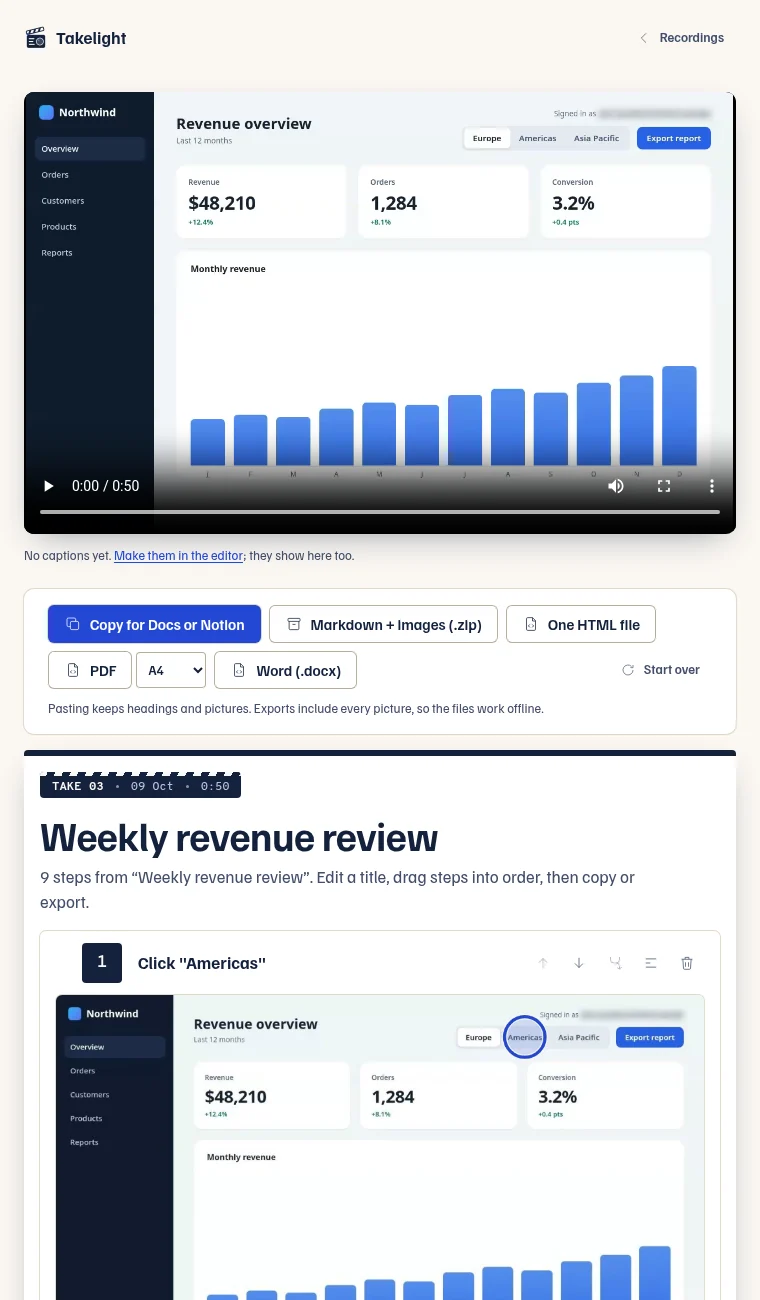
A guide: nine steps, each with a picture and a ring on the click. -
Copy it into your document
Press Copy for Docs or Notion and paste; Free copies up to 5 steps. The headings and pictures come with it. You can also export Markdown with images (a zip) for a wiki that takes files, or one HTML file, both free.
-
Add what a guide cannot show
A guide shows what to click. An SOP also needs the parts around it.
- The purpose, and when to use the procedure.
- Who owns it, and when it was last checked.
- What you need first, such as access or a file.
- How to tell that it worked.
Limits to plan for
The free plan keeps ten guides. Pro keeps any number, and adds PDF and Word files, handbooks of several guides, and video recording: a tab recording makes steps the same way, with the pictures taken from the video. Pro is €39 for 6 months, €69 for a year or €139 for Pro forever. You get 7 days of Pro, free. See the pricing table.
Choosing between tools? There are pages for a Scribe alternative and a Tango alternative, with prices as of September 2026.
Make your first procedure
Install is free and needs no account. Pick a task you explain more than once.
Takelight is an independent product.