 Takelight
Check the boundary first: browser tabs vs Windows desktop apps
psr.exe was an operating-system recorder: it logged clicks across File Explorer, control panels, installers and native Windows programs as well as browser windows. Takelight is a browser extension, so its step guides cover browser tabs only in desktop Chrome and Microsoft Edge.
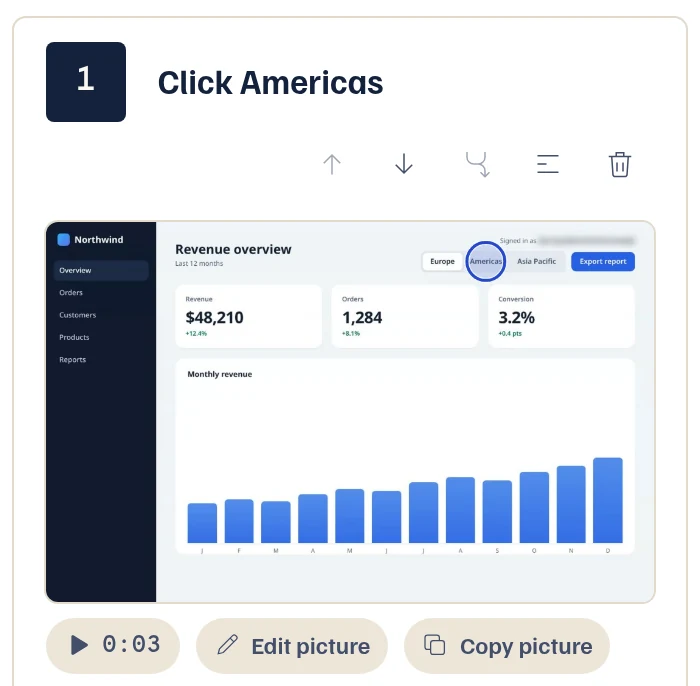
- When the task is in a web app: an admin dashboard, CRM, billing portal, ticketing tool or internal web page can be recorded directly in the tab with Takelight. Each click, typed field and page change becomes an editable step with a screenshot and a ring on the spot you clicked.
- When the task is in a native Windows program: Takelight cannot build a step guide from desktop windows outside the browser. For native Windows apps, take screenshots by hand or look at a paid desktop-capable tool; see Takelight vs Scribe for what Scribe's paid plans cover.
Why Steps Recorder files are awkward to share today
Even on Windows 11 machines where psr.exe still opens, two limits show up as soon as you hand the file to someone else:
- The output is an
.mhtarchive inside a.zip. Problem Steps Recorder packs its HTML and screenshots into an MHTML file designed for Internet Explorer. Modern browsers often download or block local.mhtfiles instead of displaying them, and helpdesk tickets or wikis cannot embed them directly. - You cannot edit or redact the screenshots after recording. Every click captures the full window or screen with account numbers, email addresses and neighbouring tabs visible, and
psr.exehas no crop, blur or step-deletion tool once you stop recording.
Windows Steps Recorder and Takelight side by side
Takelight is our own tool, so read its column with that in mind.
| Topic | Windows Steps Recorder (psr.exe) | Takelight |
|---|---|---|
| Scope | Windows desktop apps and browser windows (marked deprecated by Microsoft in Windows 11). | Browser tabs only, in Chrome 130 or later and Edge 130 or later on desktop (Windows, macOS and Linux). |
| Step titles | Low-level window and control descriptions such as “User left click on button in window”. | Readable labels from the page element you clicked, such as Click “Save changes” or Type in the “Email” field. |
| Typed text and sensitive fields | Does not log typed characters, and does not mask sensitive fields visible on screen. | Never reads or saves what you type. Password, email, phone and card autofill fields are boxed out of the pictures on every plan; Pro also boxes out emails, phone and card numbers, IBANs and keys shown as text on the page. |
| Editing after capture | Add a text comment while recording; no step reorder, step delete, crop or blur after saving. | Rename, merge, reorder or delete steps, and crop, zoom, box, arrow and blur any picture on Free. Retake one step and translate a guide on Pro. |
| Output and export | Saves a .zip containing one .mht (MHTML) file. | Free saves one self-contained HTML file, copies up to 5 steps with headings and pictures for Google Docs or Notion, and exports a bug report with browser and system details. Pro adds Markdown with images (a zip), PDF, Word (.docx), click-through guides and handbooks. |
| Price and account | Included in Windows, no account. | Free keeps ten guides and records video up to 5 minutes each, with no account and no watermark. Pro is on the pricing page. |
Sources: Microsoft Support and Windows 11 deprecated features documentation for Problem Steps Recorder (psr.exe), and the Takelight pricing page.
Reproducing a web-app bug or writing a procedure
People used psr.exe for two different jobs in web apps: sending a developer the exact clicks that triggered a bug, and writing an internal procedure (SOP) for a teammate. Takelight handles both from the same capture:
- For a bug report: click the Takelight icon on the tab, press Start guide, reproduce the problem, and press Stop guide. Each step shows where you clicked. The free bug-report export puts the numbered steps, browser version and system details in one file you can attach to the ticket.
- For an internal SOP or customer guide: edit any step title that needs context, blur customer names or order numbers on the screenshots, and save the self-contained HTML file (or copy up to 5 steps directly into Google Docs or Notion on Free). See how to create an SOP by clicking through the task for a full walkthrough with screenshots.
- When a video is clearer than screenshots: the same extension records your tab, a window or the screen to an MP4 file on your computer, up to 5 minutes per video on Free, with the cut editor and on-device captions in 26 languages. On Pro, one recording produces both the video and the numbered step guide.
What is free and what Pro adds
- Free: step guides from your clicks in a browser tab (ten guides kept), no account, no watermark, boxed password/email/phone/card fields, crop/zoom/box/arrow/blur on any step picture, one HTML file export, bug-report export with browser and system details, full-page screenshots up to 8,000 pixels tall, copy up to 5 steps for Docs or Notion, and video recordings up to 5 minutes each with on-device captions (
.srtand.vtt). - Pro: unlimited guides and video length, copy any number of steps for Docs or Notion, Markdown with images (a zip), PDF and Word (
.docx) export with your logo and accent colour, click-through HTML guides, multi-guide handbooks, retake one step, translate a guide, automatic boxing of emails, phone numbers, card numbers, IBANs and keys shown as text on the page, and a step guide made from a recorded video. Full pass details are on the pricing page.
A one-month pass includes the Pro exports.
Questions
Why did Microsoft deprecate Windows Steps Recorder?
Microsoft's Windows deprecation list marks Problem Steps Recorder (psr.exe) for removal in a future Windows 11 update and directs users to Snipping Tool, Clipchamp and Xbox Game Bar. Those three tools record video or single screenshots rather than a numbered step-by-step document.
Does Takelight record native Windows desktop apps like psr.exe?
No. Takelight is a browser extension for Chrome 130 or later and Edge 130 or later on desktop. It builds step-by-step guides from browser tabs only and does not write step guides for native Windows desktop software, File Explorer or system dialogs.
What file format does Takelight save instead of an MHT file?
On the free plan, Takelight saves a self-contained HTML file that opens in any modern browser, copies up to 5 steps with headings and pictures for Google Docs or Notion, and exports a bug report with browser and system details. Pro adds Markdown with images (a zip), PDF, Word (.docx), click-through guides and multi-guide handbooks.
How much of Takelight is free?
Free keeps ten step guides and records video up to 5 minutes each, with no account and no watermark. Password, email, phone and card autofill fields are boxed out of the pictures automatically, and crop, zoom, box, arrow and blur work on any step picture.
Try it on one browser task
Install is free and needs no account. Click through a task in Chrome or Edge and see the numbered steps and pictures on your computer.
Takelight is an independent product and is not affiliated with Microsoft.
More guides
- Create an SOP by clicking through the taskClick through a task once, then edit and copy the written steps. Six steps with screenshots.
- A Tango alternative for Chrome and EdgeHow Takelight compares with what Tango publishes for its free plan.
- Takelight vs ScribeWhen Scribe's desktop capture and team features are worth paying for, and when free browser capture is enough.